Control Panel Root & Reseller Manager1.5.2
Publisher Description
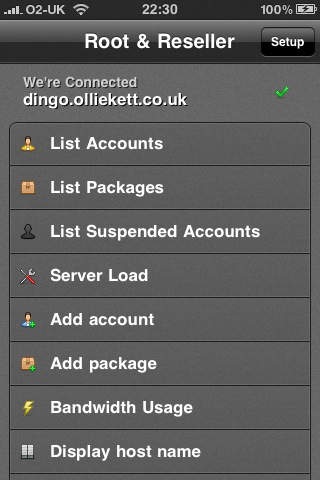
Control Panel Root & Reseller Manager allows you to control your CPanel WHM account. This allows you to connect to your server and carry out various functions. Allows you to carry out tasks on the moves.
NOW with Multi Server login support.
NOW with all function Restart
Faster over EDGE and 3G data
Option Select
Add as many account as required and select upon start-up. Our application handles 1 to unlimited servers.
List Accounts
Shows all accounts, Suspend, Read hosting package, Users root, Registered Date.
List Packages
Shows all packages, Package Name, Quota, Bandwidth
List Suspended
Shows all suspended, Unsuspended, Reason, Suspended Date
Server Load
Read Server Loads at One Min, Five Min and Fifteen Min
Add Account
Add account by Domain, User, Password, Email and Set Package.
Add Package
Package Name, Quota, Bandwidth, FTP accounts, Mail accounts, Databases, Sub accounts, Parked domains and Add-on domains.
Bandwidth Usage
Shows all users, Usage in Megabytes and Usage in Kilobytes
Display host name
Displays the Servers host name
Reboot Server
Allows server reboot
List IP's
Lists IP addresses on the server
List Resellers
List reseller accounts
Restart HTTPD
Restart your Apache Web Server
Restart FTP
Restart your FTP Service
Restart IMAP
Restart your IMAP Server
Restart MySQL
Restarts your MySQL Server
Restart Other
Restart Named (DNS), Interchange, Exim (Mail), PostgreSQL (SQL), SSHD (SSH), TomCat, CPPop (POP3)
Lists SSL
Certificates and accounts linked too.
Help and support for this application is offered within the application as well as www.cpapp.com
cPanel , WHM is a registered trademark of cPanel Inc. This application has been developed by a third-party developer and are not endorsed, tested, or associated with cPanel Inc.
Requires iOS 3.0 or later. Compatible with iPhone, iPad, and iPod touch.
About Control Panel Root & Reseller Manager
The company that develops Control Panel Root & Reseller Manager is OKD Limited. The latest version released by its developer is 1.5.2.
To install Control Panel Root & Reseller Manager on your iOS device, just click the green Continue To App button above to start the installation process. The app is listed on our website since 2009-11-02 and was downloaded 7 times. We have already checked if the download link is safe, however for your own protection we recommend that you scan the downloaded app with your antivirus. Your antivirus may detect the Control Panel Root & Reseller Manager as malware if the download link is broken.
How to install Control Panel Root & Reseller Manager on your iOS device:
- Click on the Continue To App button on our website. This will redirect you to the App Store.
- Once the Control Panel Root & Reseller Manager is shown in the iTunes listing of your iOS device, you can start its download and installation. Tap on the GET button to the right of the app to start downloading it.
- If you are not logged-in the iOS appstore app, you'll be prompted for your your Apple ID and/or password.
- After Control Panel Root & Reseller Manager is downloaded, you'll see an INSTALL button to the right. Tap on it to start the actual installation of the iOS app.
- Once installation is finished you can tap on the OPEN button to start it. Its icon will also be added to your device home screen.
